ramphearth /ˈramp-härth/

from rampart, the wall that keeps a house safe, and hearth, where the house gathers.

  • n.The one space where your team and your community talk, meet, and belong.
  • n.A private place to gather: safe walls, a warm fire, and the people you already know around it.
Chat · Voice · Virtual Office · Meetings · Tables

One space for your team, and your community.

Channels and threads to talk in, voice rooms to drop into, and a Virtual Office you actually walk into. Around it: meetings outside guests can join, smart Tables, Shifts, flash cards and an open integrations platform. One product for a company, a church, a creator's community or a gaming guild.

Start on Free. No card needed. Built for groups that know each other, from a team of five to a community of thousands.

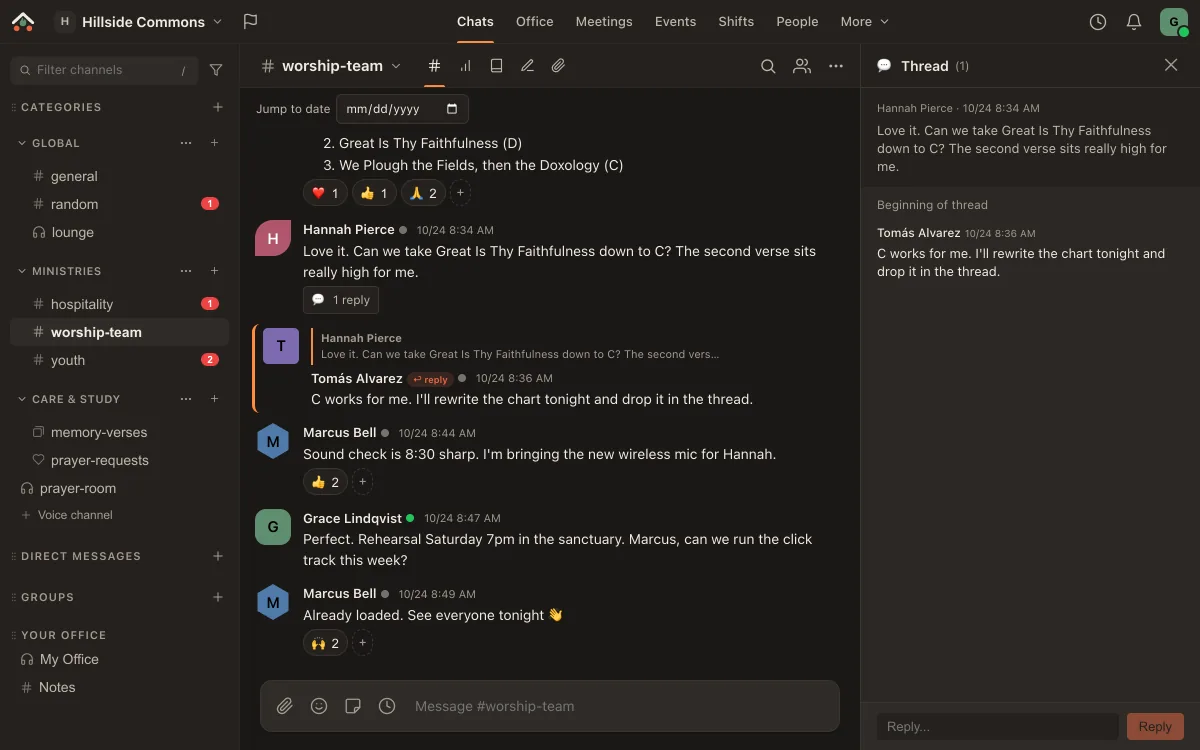
The real Ramphearth app with the worship-team channel of a demo church workspace, Hillside Commons, open: Grace posts Sunday's set list, which gets heart, thumbs-up and praying-hands reactions; Hannah asks to move a song down to C and Tomás answers in a thread; Marcus confirms sound check and the click track. On a computer the sidebar beside it lists the workspace's channels by category (general, random, hospitality, youth, memory-verses, prayer-requests and voice rooms) with unread counts; on a phone the Chats, Activity, Office, Shifts and You tabs sit below. The real Ramphearth app with the worship-team channel of a demo church workspace, Hillside Commons, open: Grace posts Sunday's set list, which gets heart, thumbs-up and praying-hands reactions; Hannah asks to move a song down to C and Tomás answers in a thread; Marcus confirms sound check and the click track. On a computer the sidebar beside it lists the workspace's channels by category (general, random, hospitality, youth, memory-verses, prayer-requests and voice rooms) with unread counts; on a phone the Chats, Activity, Office, Shifts and You tabs sit below.

A real capture of the app as it is today, in a demo workspace. More screenshots further down.

Four tools' best ideas, in one tab

Chat like Slack Privacy a workplace can sign off on Community like Discord Presence like a real office
Self-funded and private

If you make an account, we will never sell or share your data, ever.

No ads, no trackers, no data brokers, no "partners", no AI training on your content. The only companies that touch your data are the infrastructure we run on, and every one of them is named.

What is Ramphearth

Talk, be together, meet and organise, without switching apps.

Most tools give you a wall of channels and a presence dot. Ramphearth adds a room you can walk into, then the tools a company or community actually runs on: tables, rosters, documents and meetings, next to the conversation they belong to.

Talk

Channels, threads and voice

Organised channels, threads, DMs and group chats, plus voice rooms you drop into and calls with video and screen share.

Be together

A Virtual Office

Sit at a table, hear who's nearby, and wander over. Voices fade with distance, the way a real room works.

Meet

Meetings with guests

Schedule a meeting, invite people outside your space, and let them in from a lobby. No account needed to join.

Organise

Tables, Shifts and more

Smart Tables with formulas, rosters and volunteer sign-ups, a knowledge base, boards, whiteboards and flash cards.

Features

Everything you'd open five apps for, designed to feel like one.

Every surface shares the same clean interface, so going from a chat to a Table to the office floor never feels like switching tools. Where a feature belongs to a particular plan, the card says so. Only what you use: an Owner or Admin can switch off any feature the workspace doesn't need in Org Settings (prayer requests, meal trains, looking-for-group…), and nothing is deleted.

Chat

Channels that feel like home

Threads, reactions, @mentions that complete as you type, fast search, polls, scheduled messages, saved messages, link previews and your own custom emoji. Familiar from the first minute, whether your people came from Discord or Slack.

# threads@ mentions◷ scheduled▤ polls☺ custom emoji
Voice & calls

Drop in, don't dial in

Voice channels you wander into, and DM or group calls with camera and screen share. A call keeps going while you move around the app, and noise reduction has a level for every room, including Outdoor for wind. Ramphearth suggests it when it hears a gust. Cameras and more than one screen share at a time come with the paid plans.

Need an audience? A host can turn a voice channel's call into a Stage while it's live: hosts and the speakers they invite talk, everyone else listens and can raise a hand. Stages come with the paid plans, and Enterprise gets larger ones. You can also schedule one ahead, with Remind me, reminders, a green room before Go live and a Q&A people can upvote.

♪ voice channels▶ video + share≋ noise reduction⇲ call dock
Virtual Office · the showpiece Ministry · Creator · Business

An office you can actually walk into

Open the floor and you're in it. Sit at a table and you hear the people there clearly; nearby tables fade to a gentle overhear you can lean into. Floors have their own ambience and music, a mini-map keeps you on the floor while you work elsewhere in the app, and you can knock to join a table. You're invisible until you step in, and idle time sets you away on its own.

Start a floor from a template, then make it yours in the layout editor: rooms, a lounge, focus booths and a stage, tables, jukeboxes that play your own uploads or built-in sounds, and props from the decor catalogue. On a phone you see who's in, where they are, and join a table with a tap.

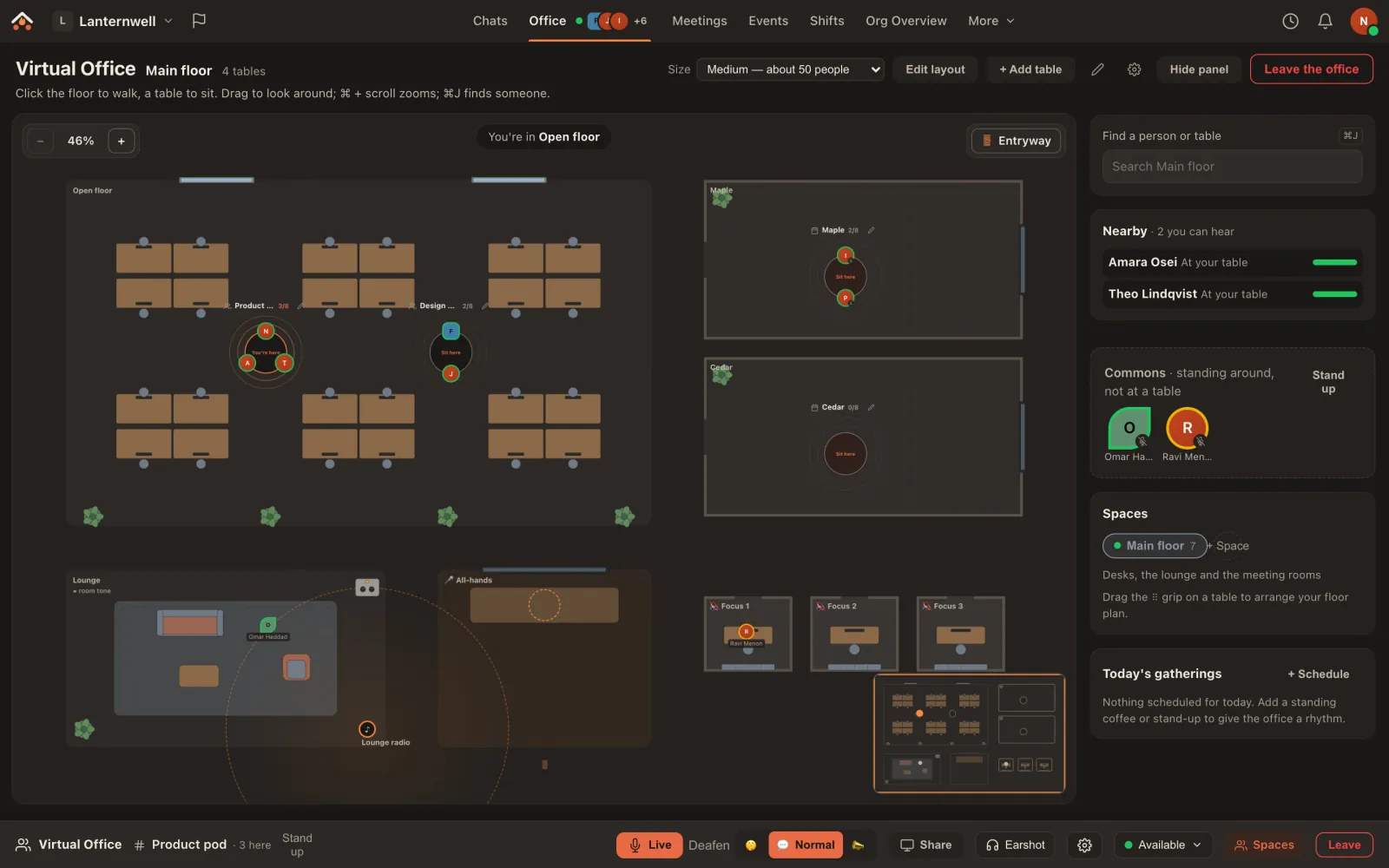
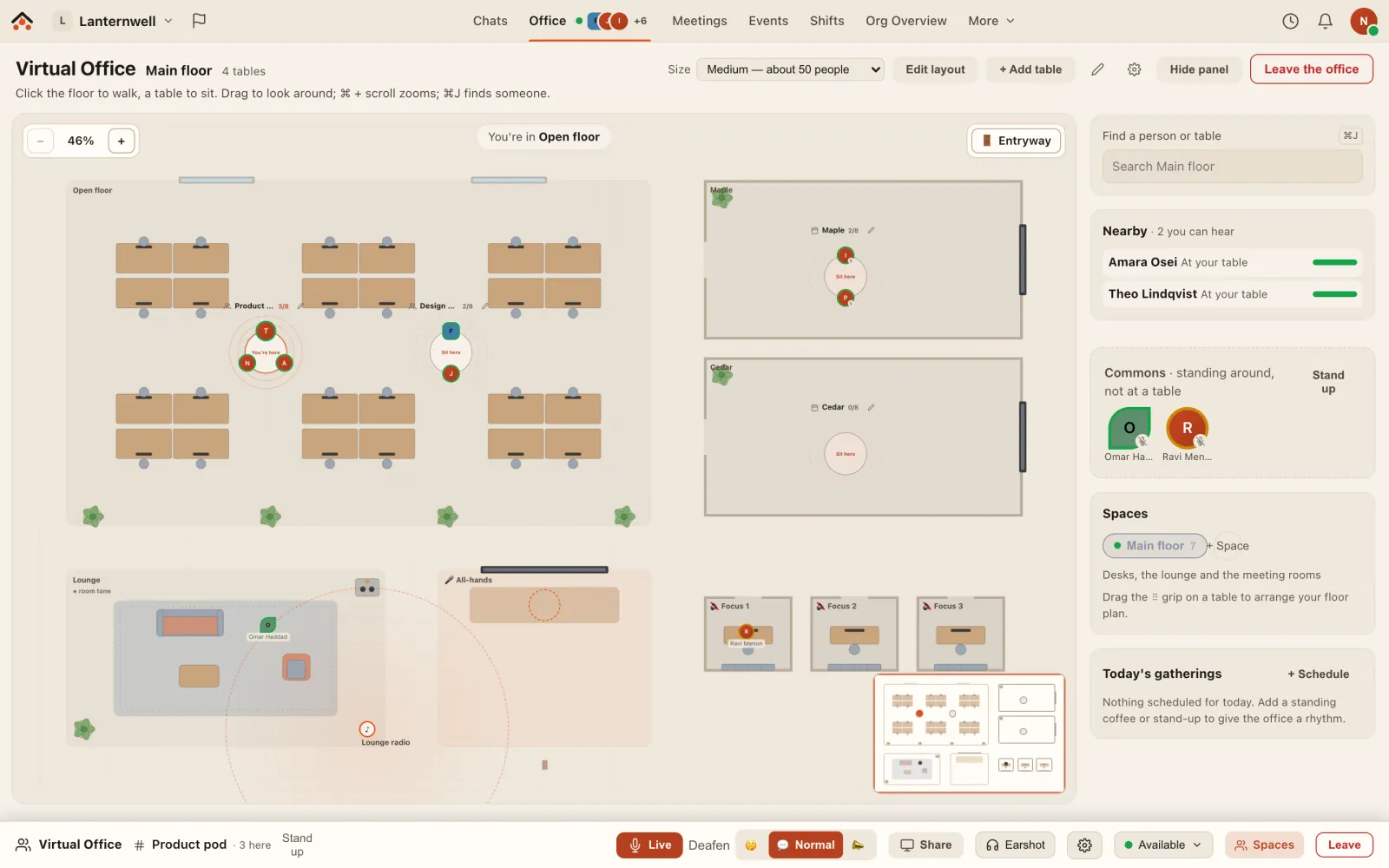
The real Ramphearth Virtual Office for a demo team, Lanternwell, on its Main floor, a Medium floor built from the Open office template. On the open floor, among desk clusters and plants, Nora Whitfield (you), Amara Osei and Theo Lindqvist sit at the Product pod, and Felix Moreau and June Takahashi at the Design pod. Isla Brennan and Priscilla Vance sit in the Maple meeting room; the Cedar room is empty. Omar Haddad stands in the Lounge by its Lounge radio jukebox, and Ravi Menon is in a focus booth set to Focus. An All-hands stage, a mini-map in the corner, and a side panel listing who you can hear nearby: Amara and Theo, at your table. The real Ramphearth Virtual Office for a demo team, Lanternwell, on its Main floor, a Medium floor built from the Open office template. On the open floor, among desk clusters and plants, Nora Whitfield (you), Amara Osei and Theo Lindqvist sit at the Product pod, and Felix Moreau and June Takahashi at the Design pod. Isla Brennan and Priscilla Vance sit in the Maple meeting room; the Cedar room is empty. Omar Haddad stands in the Lounge by its Lounge radio jukebox, and Ravi Menon is in a focus booth set to Focus. An All-hands stage, a mini-map in the corner, and a side panel listing who you can hear nearby: Amara and Theo, at your table.
The real app: a demo team's Main floor, with two tables talking, a meeting in Maple, and people in the lounge and a focus booth.
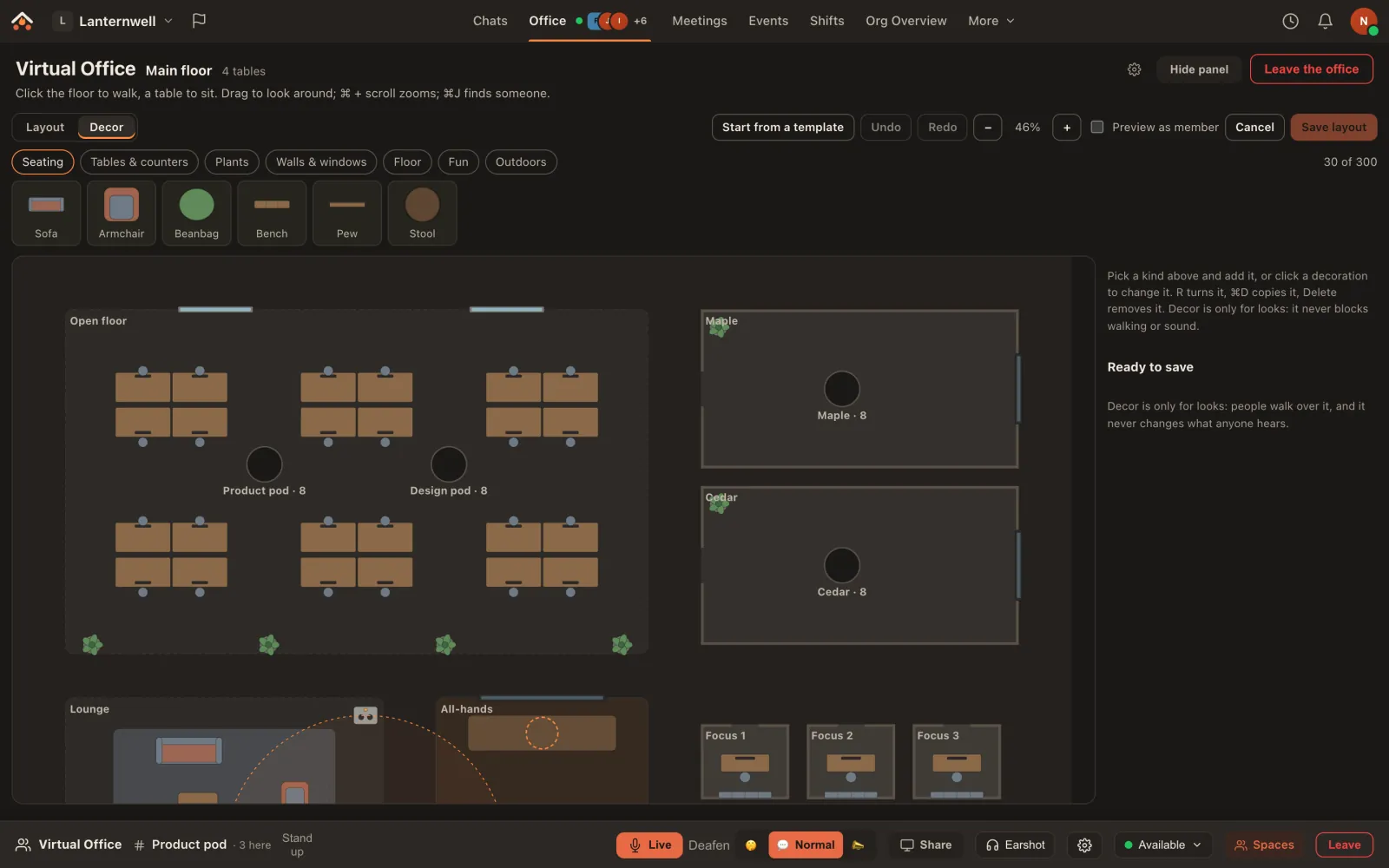
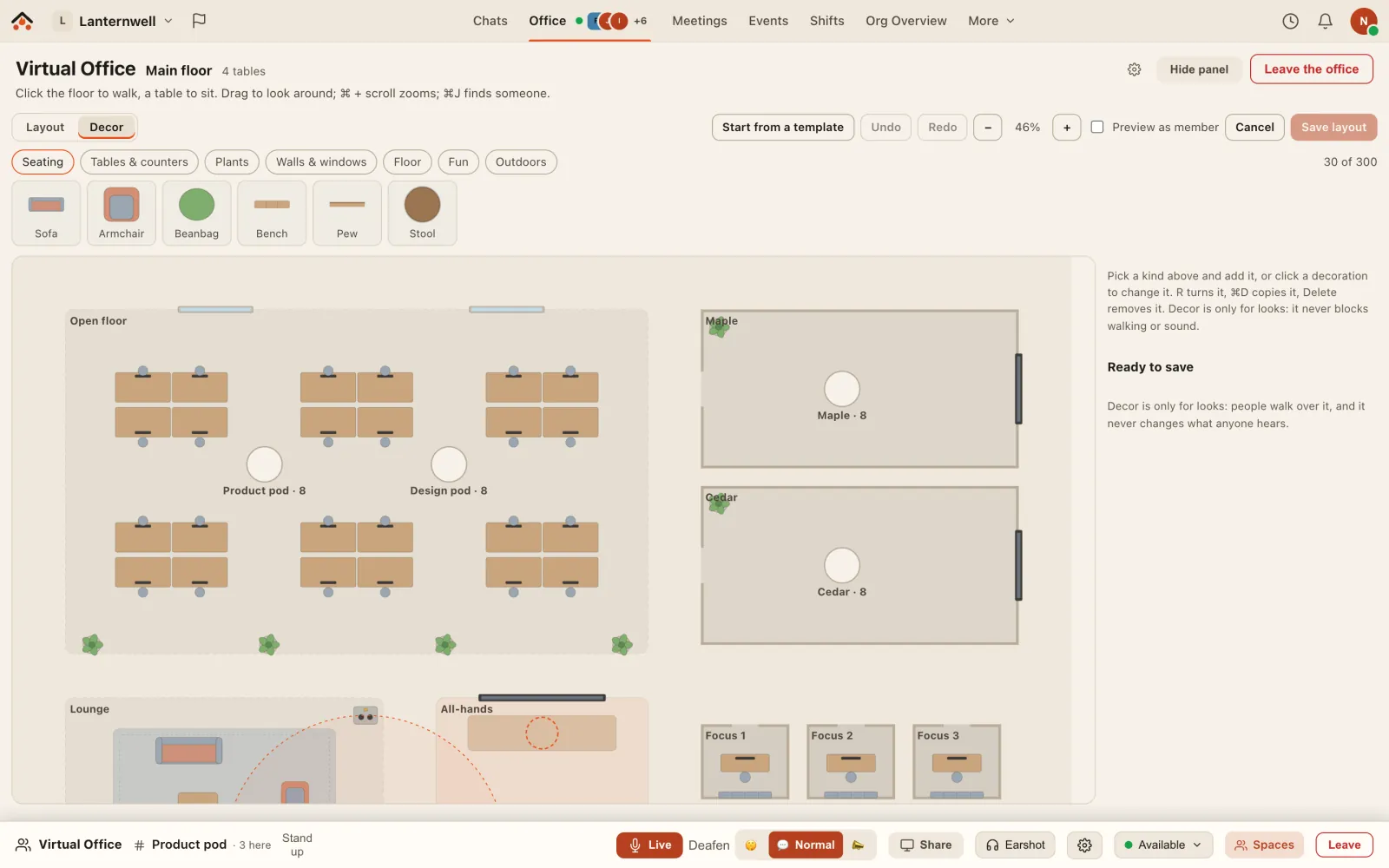
The real Ramphearth layout editor on the same floor, open on its Decor tab: categories Seating, Tables and counters, Plants, Walls and windows, Floor, Fun and Outdoors; the seating props Sofa, Armchair, Beanbag, Bench, Pew and Stool; Start from a template, Undo, Redo, Preview as member and Save layout; 30 of 300 decorations used, and a note that decor is only for looks and never changes what anyone hears. The real Ramphearth layout editor on the same floor, open on its Decor tab: categories Seating, Tables and counters, Plants, Walls and windows, Floor, Fun and Outdoors; the seating props Sofa, Armchair, Beanbag, Bench, Pew and Stool; Start from a template, Undo, Redo, Preview as member and Save layout; 30 of 300 decorations used, and a note that decor is only for looks and never changes what anyone hears.
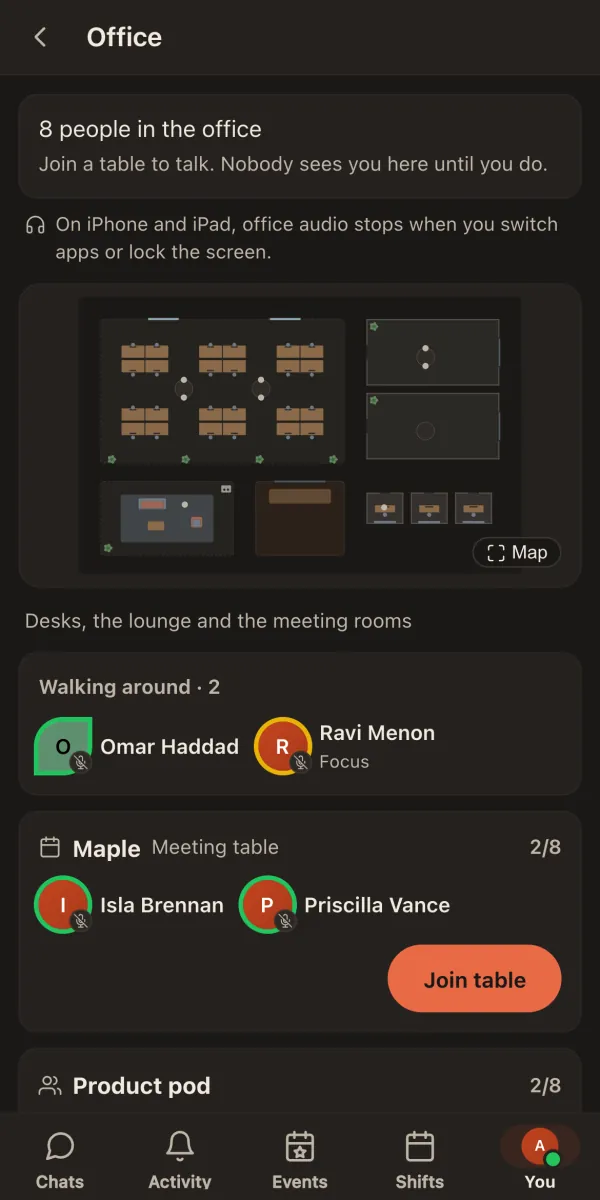
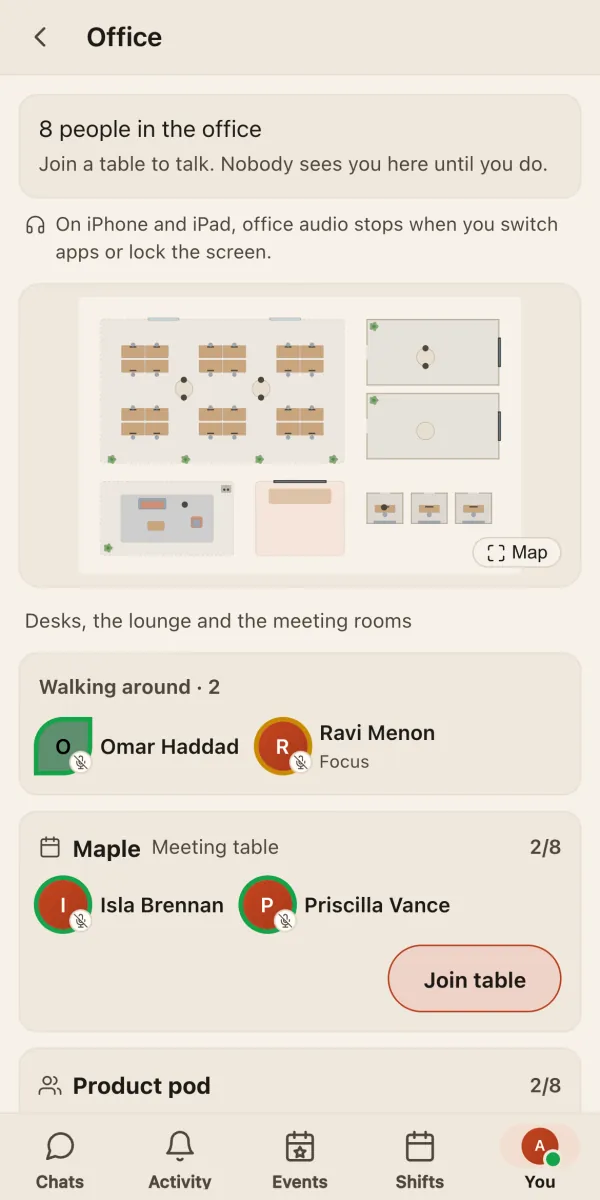
The real Ramphearth office on a phone: 8 people in the office, a read-only map of the floor, Omar Haddad and Ravi Menon walking around, and Isla Brennan and Priscilla Vance at the Maple table with a Join table button. The real Ramphearth office on a phone: 8 people in the office, a read-only map of the floor, Omar Haddad and Ravi Menon walking around, and Isla Brennan and Priscilla Vance at the Maple table with a Join table button.
The real app: the layout editor's decor catalogue, and the same office on a phone.
◐ proximity audio▦ templates + decor♪ jukeboxes▣ mini-map✋ knock to join☏ works on phones
Privacy

Encrypted at rest

Files and messages are always stored encrypted, in every space: each message is sealed under your space's own key, and search keeps working without storing your words. Owners can rotate the key. At-rest protection, not end-to-end.

Content encrypted at rest
AES-256-GCM · per-space key
Safety · new

Safe by default, without reading over anyone's shoulder

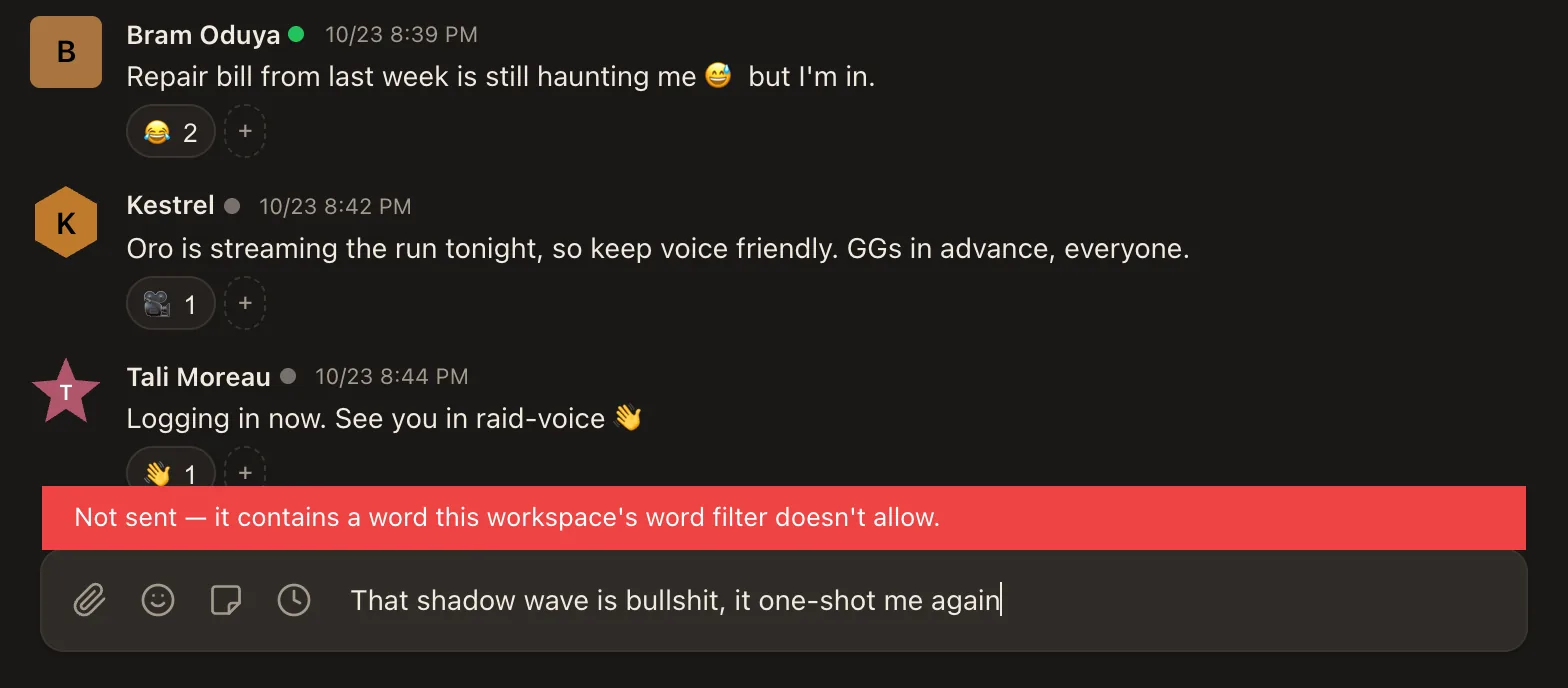
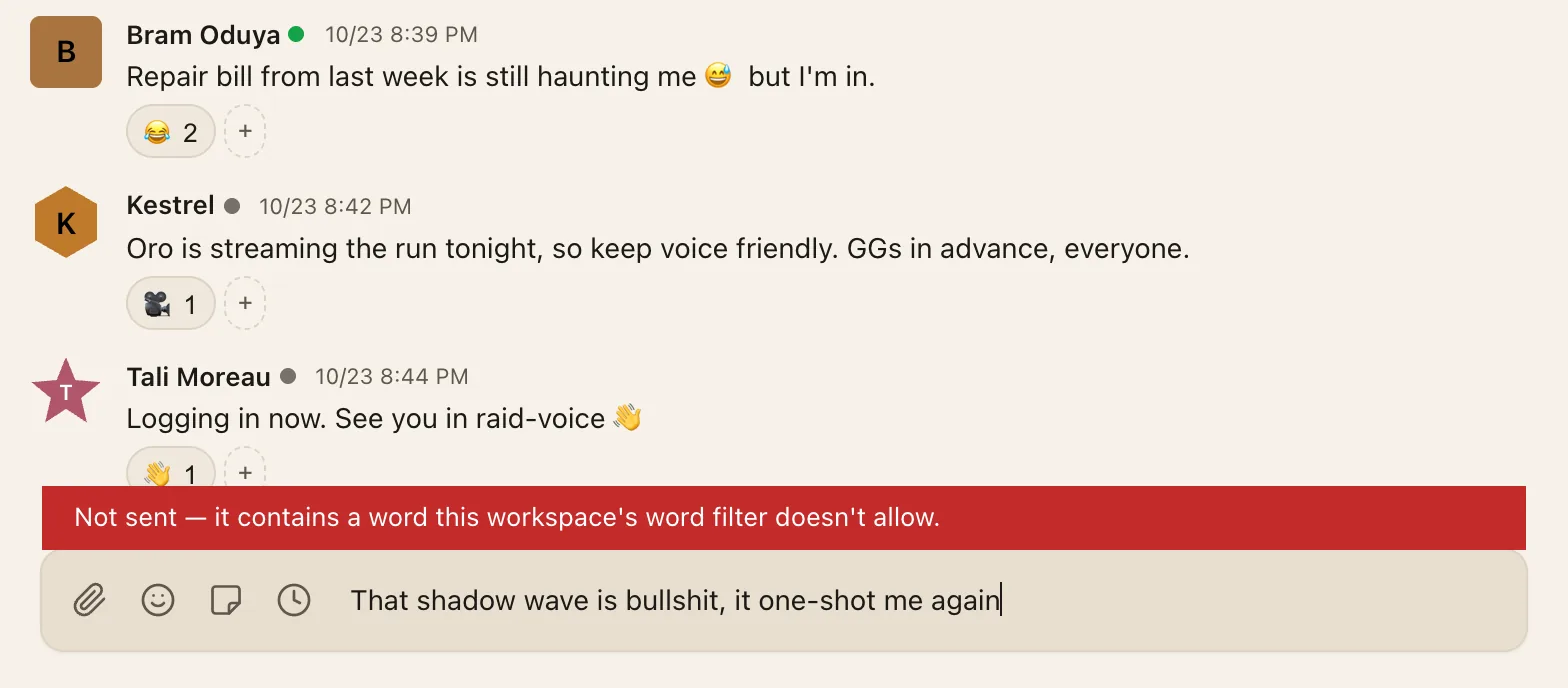
A word filter checks messages, edits and names when they're sent, before they're saved. Slurs, hate terms and sexually explicit words are blocked in every workspace, and swearing is blocked by default; an Owner can switch that off, or add and allow words of their own. Nothing blocked is sent: you see why, and your words stay in the box to fix. It's a list of words checked on send, not a person or an AI reading your chats, and we don't keep what it stopped.

Ramphearth is for people 13 and older. Sign-up asks for the month and year you were born and keeps only the year. We don't ask for ID, so it's the age you tell us. People aged 13 to 17 get teen-safe settings: only members of their own workspaces can start a DM with them, their email is hidden, channels marked 18+ are hidden, and notifications leave out message text. Anyone can report an underage account, and we delete the ones we confirm.

Word filterAlways-on list for slurs and explicit words; swearing is the Owner's call.
Teen-safe settingsFor 13 to 17: no DMs from strangers, no email shown, no 18+ channels.
Underage reportsFrom someone's name, or a public form for people without an account.
The bottom of a real Ramphearth chat: a red note reading: Not sent, it contains a word this workspace's word filter doesn't allow, above the message box, which still holds the text. The bottom of a real Ramphearth chat: a red note reading: Not sent, it contains a word this workspace's word filter doesn't allow, above the message box, which still holds the text.
The real app: a message the word filter stopped. Nothing was sent, and the text is still there to fix.
Meetings Guests on Business

Meet anyone with a link — no download, no account, a lobby you control, right in the browser

Schedule a meeting from Ramphearth and invite anyone by email. Guests open the link in their browser, give their name (and confirm their address, if you ask them to) and wait in the lobby until a host lets them in. No account, no install, and no timer ends the meeting while people are still in it. Hosts can mute, remove and promote people; everyone chats, shares files and draws on a live whiteboard together, guests included. Invites carry calendar files that update when the meeting moves. Meetings with your own members are on every plan; outside guests come with Business.

Lobby and host controlsGuests knock, hosts admit. Mute, remove and change roles mid-call.
Files and a live whiteboardShared in the call for everyone admitted, and kept on the meeting page after.
Real calendar invitesEmail invites with .ics files that follow every change, plus subscribable calendar feeds.
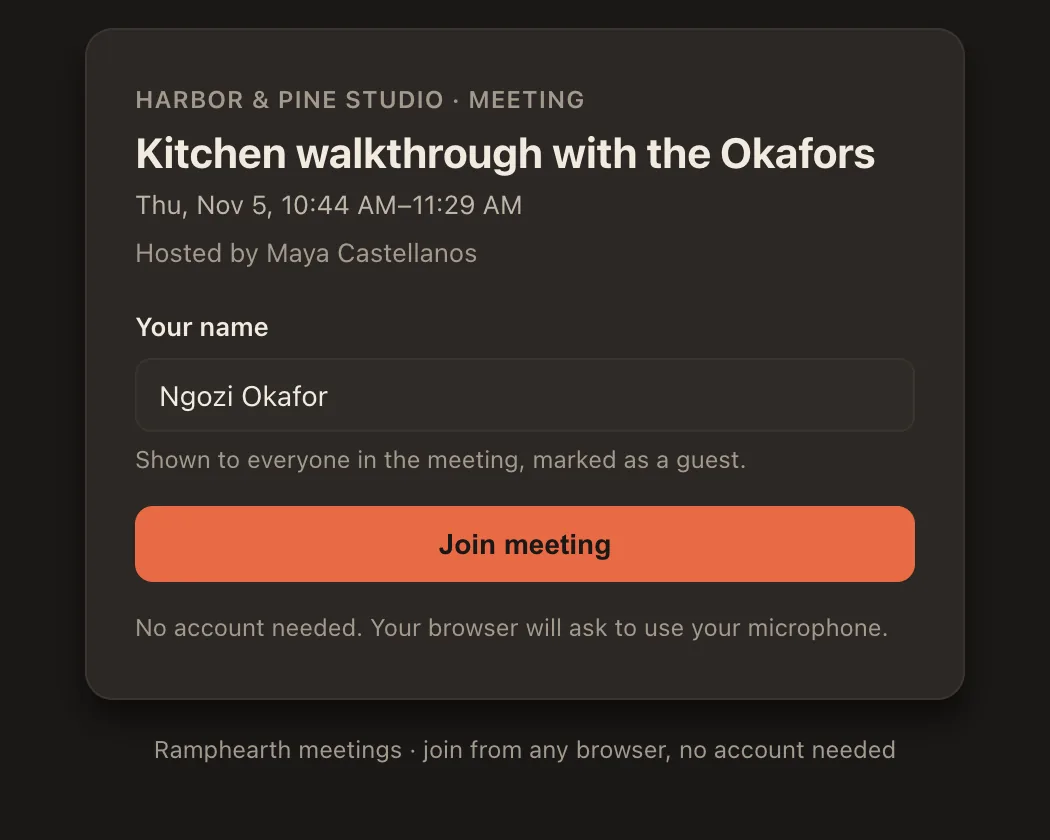
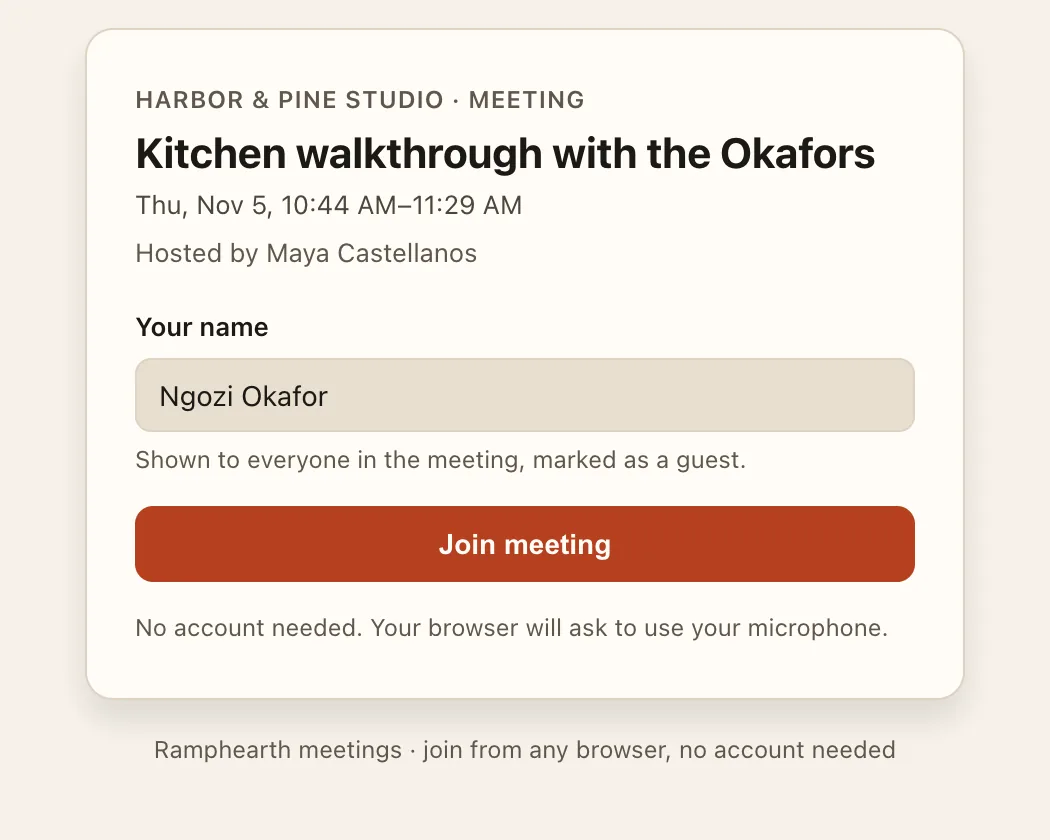
The real Ramphearth meeting page a guest sees after opening an invite link in a browser: the meeting's name, time and host, a box for their name, a Join meeting button and the words: No account needed. The real Ramphearth meeting page a guest sees after opening an invite link in a browser: the meeting's name, time and host, a box for their name, a Join meeting button and the words: No account needed.
What a guest sees: the real meeting page, opened from an invite link with no account. Meetings for business
Calls · new

Point at the thing you mean

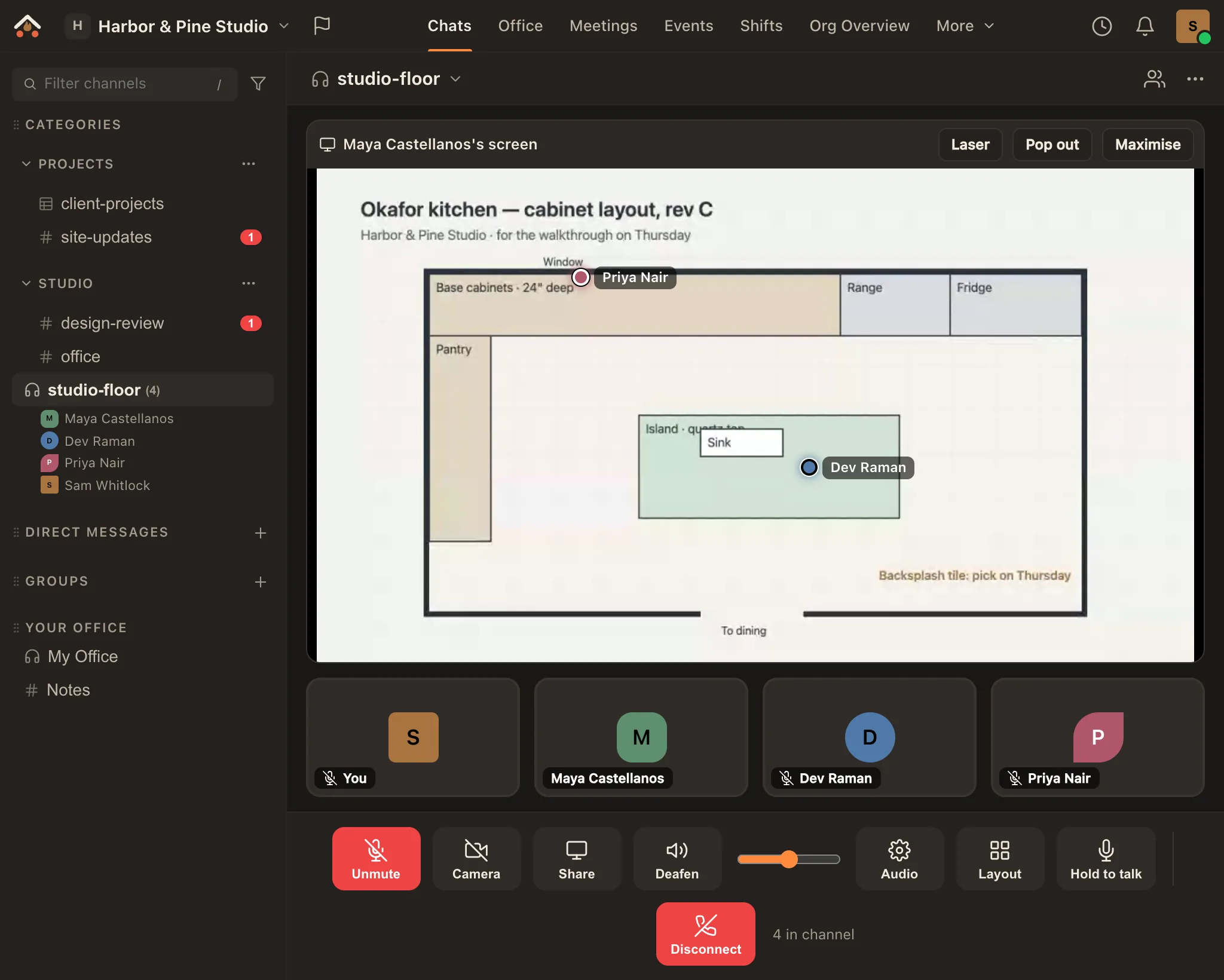
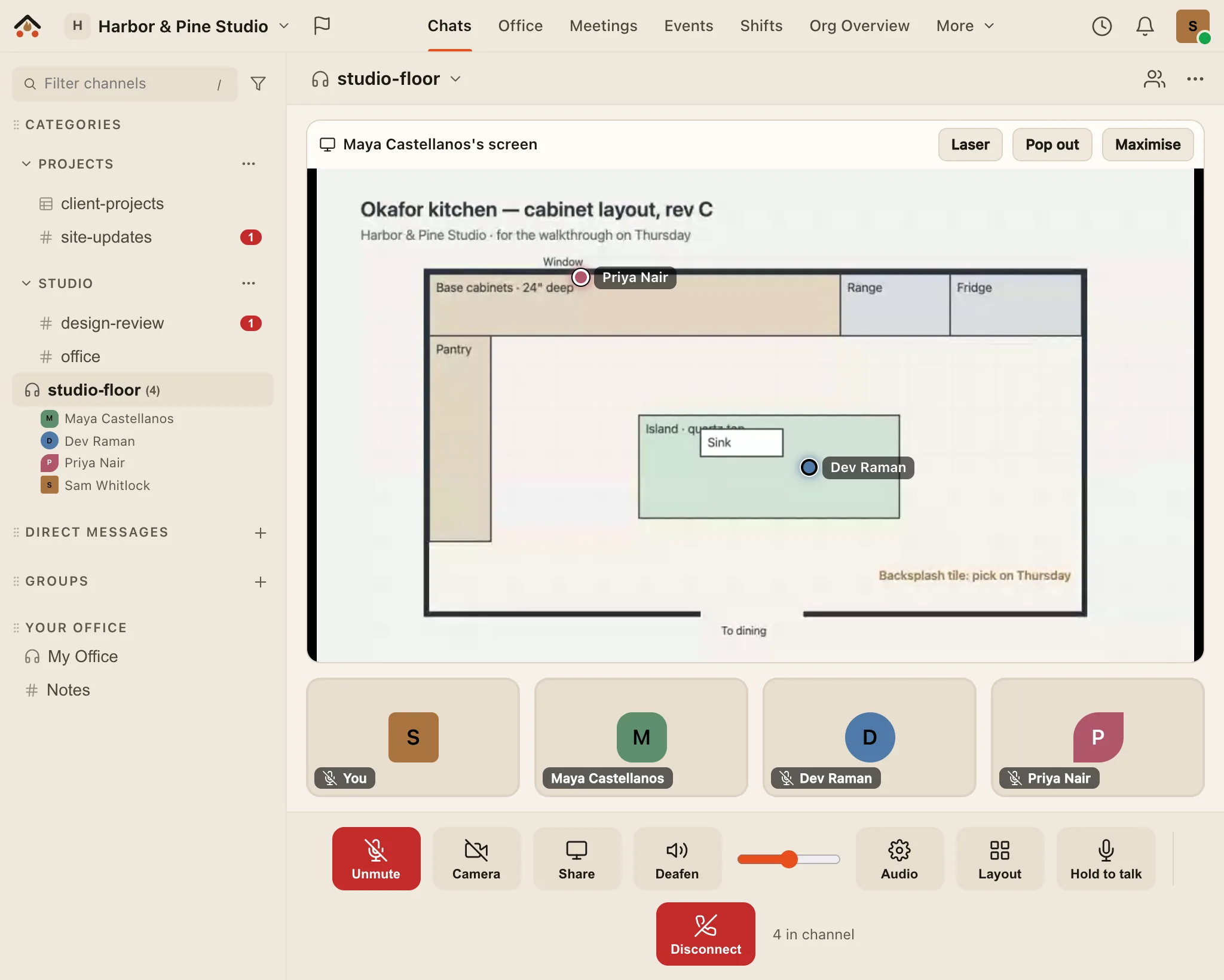
Turn on Laser on someone's shared screen and move your mouse over it, or touch and hold on a phone. Everyone watching sees your dot in your own colour, with your name when they hover it, so "no, the other one" becomes a dot on the other one. The person sharing, or a host, can turn pointers off for their screen. It works in voice channels, DM and group calls and meetings, and nothing about it is stored or recorded. Screen share goes up to 4K on Creator and Business.

The real Ramphearth app in a voice call: Maya is sharing a drawing of a kitchen layout, and two laser dots sit on it, Dev Raman's on the island and Priya Nair's by the window, each labelled with its owner's name. The real Ramphearth app in a voice call: Maya is sharing a drawing of a kitchen layout, and two laser dots sit on it, Dev Raman's on the island and Priya Nair's by the window, each labelled with its owner's name.
The real app: two people pointing at a shared kitchen plan in a voice call, each with their own coloured dot.
Tables · new Business

Smart tables that live next to the conversation

A Table is a channel with a grid: typed columns (dates, people, dropdowns, currency, percent and more), formulas, history on every row and a thread for each one. On a phone it turns into cards you can tick off with a thumb. Bring work in from CSV or Excel and take it back out. Share a view with an outside partner and they see only the rows and columns you chose, in their own workspace. Nothing else leaves the server.

Formulas and typed columnsCalculated on the server, with paste from any spreadsheet and fill handles.
Cards on phonesThe same Table as cards, with filters, quick status and photos from the camera.
Shared viewsA filtered window for a contractor or partner, published as its own channel.
Flash cards · new

Shared decks, your own schedule

Put decks in any channel: memory verses, raid callouts, onboarding terms. Everyone studies the same cards on their own spaced-repetition schedule, with a streak, a daily reminder and big thumb-sized buttons. Import Anki decks (.apkg) or CSV.

What is the Atrium? Good · 10m
John 3:16 due today
Raid callout: “stack left” 6d
Shifts · rosters & serving Ministry · Business

Rosters for workplaces, sign-ups for volunteers

Build the week or the event, say what each one needs ("2 greeters, 1 on sound") and post open slots for people to claim. Swaps and time off go through approvals, and the time clock can be switched off for teams that don't need it. A ministry mode uses the language of serving, not employment.

Sunday 9:00 · Greeter 2 of 2
Sunday 9:00 · Sound open
Tue swap request approve?
Organise & document

A board, a whiteboard and a knowledge base in every channel

Plan on a Kanban board, think out loud on a live multiplayer whiteboard, and write it down in a searchable knowledge base where drafts go live after review. They sit next to the conversation, so nothing gets lost in another app.

BoardColumns, cards, assignees and due dates.
WhiteboardsAn infinite canvas with live cursors.
KnowledgeDocs with an approval step and revisions.
Forums · new Every plan · one on Free

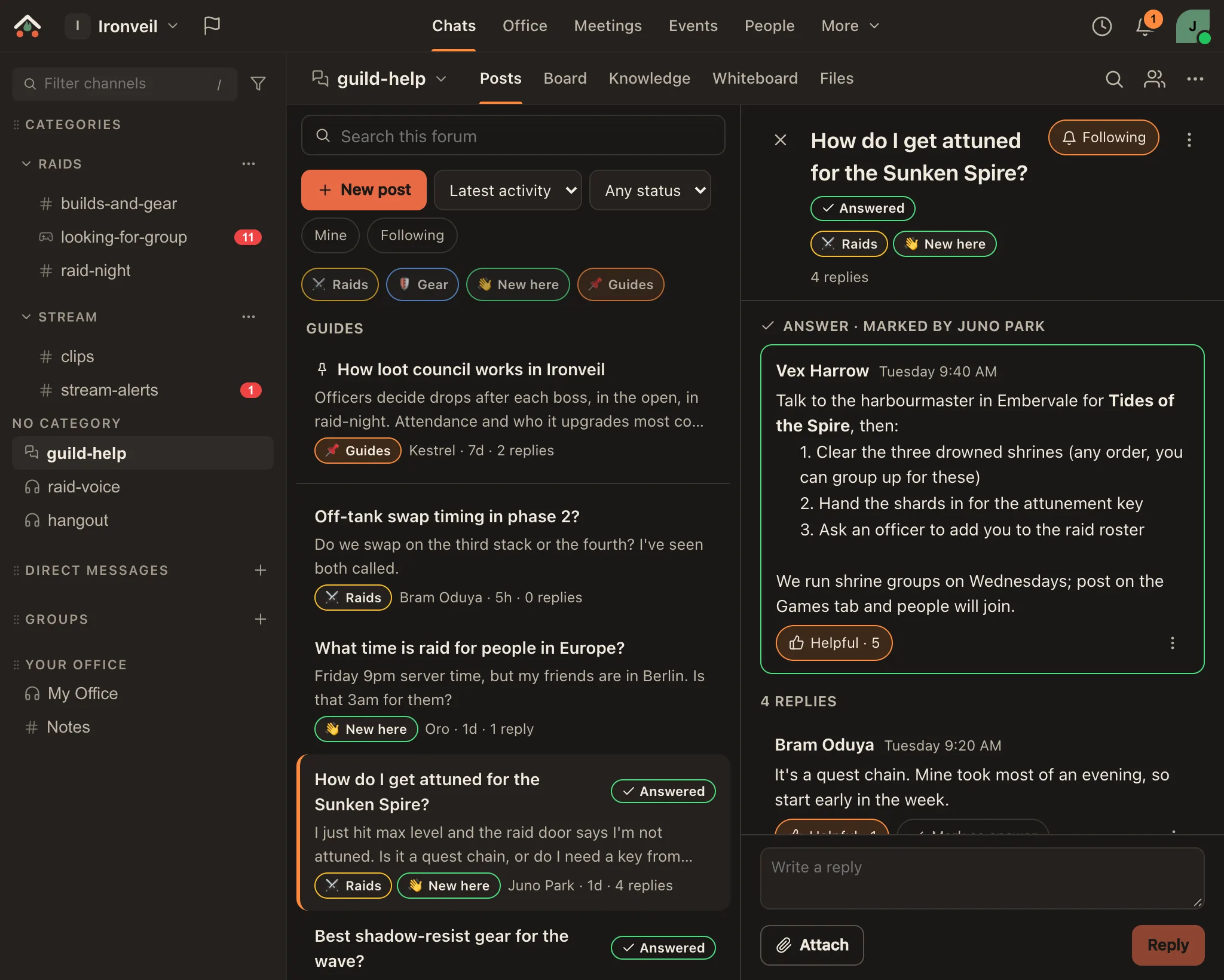
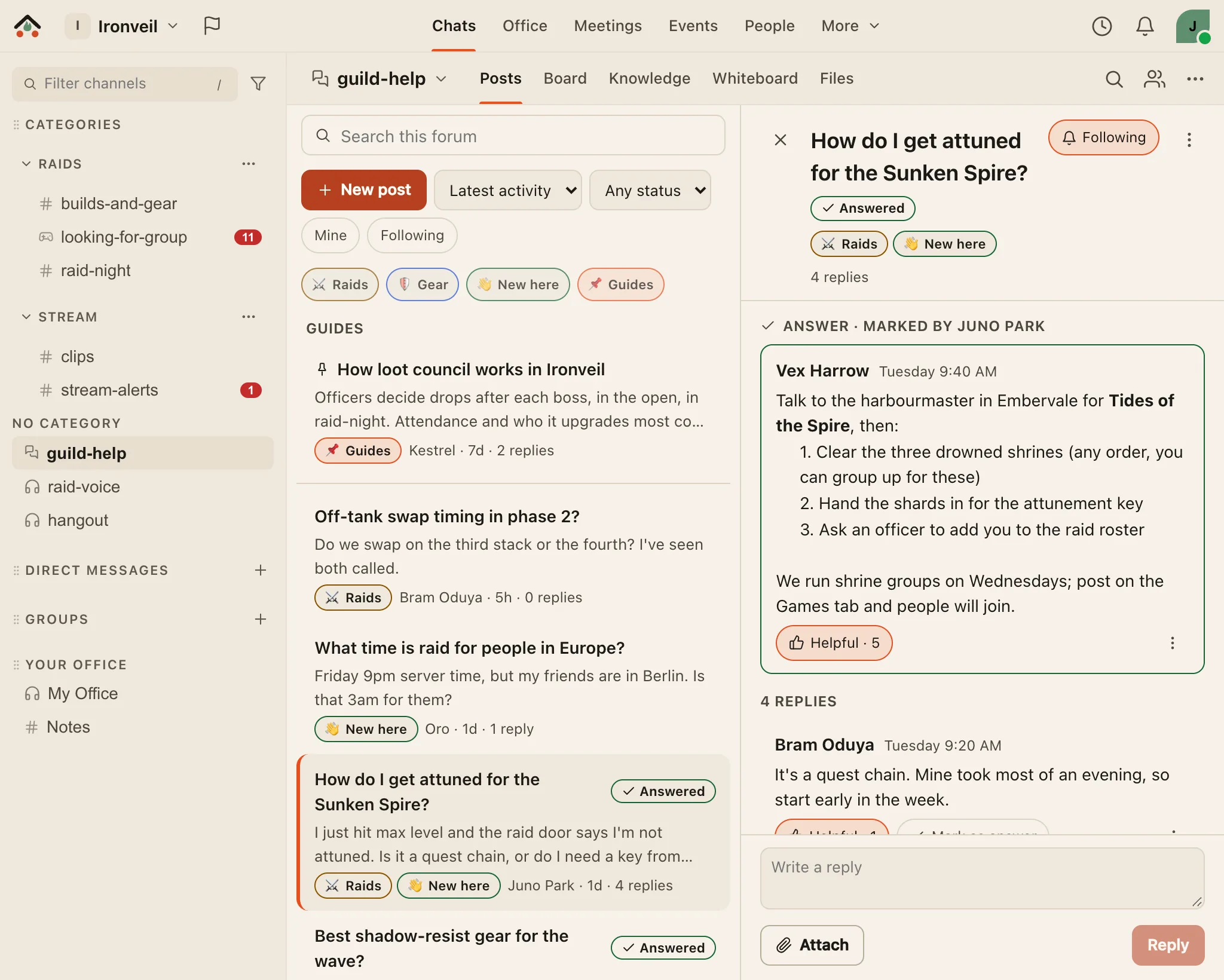
Questions that get answered, and stay answered

A forum channel is for questions and how-tos. Every post has a title, tags and its own replies. The person who asked, or a moderator, marks the answer, and anyone can mark a reply Helpful, so the next person to ask finds it first. Sort by unanswered or most helpful, search titles and replies, follow a post or a tag, and save a good answer to the channel's Knowledge. Every plan has forums: one on Free, 25 on Ministry and Creator, 100 on Business.

Accepted answersMarked by the asker or a moderator, with Helpful counts on every reply.
Tags and templatesModerators choose the tags, can require one, and give new posts a template.
Moderator toolsLock, close as a duplicate, pin as a guide, move, and slow mode for new members.
The real Ramphearth app: a guild's help forum with tags Raids, Gear, New here and Guides, and an open post, How do I get attuned for the Sunken Spire?, marked Answered, showing the reply the asker marked as the answer with five Helpful marks. The real Ramphearth app: a guild's help forum with tags Raids, Gear, New here and Guides, and an open post, How do I get attuned for the Sunken Spire?, marked Answered, showing the reply the asker marked as the answer with five Helpful marks.
The real app: a guild's help forum, with the answer the asker marked and its Helpful count.
Care & coordination

Show up for your people when it matters

Post prayer requests with who and what to pray for. The people who tapped "I prayed" hear when there's an update or an answer, and a daily digest gathers what's open. Anonymous requests stay anonymous everywhere. Start a meal train when someone has a new baby or a hard week, and use shared availability to find the night that works. A Bible study channel opens on the verse of the day and your group's reading plan (front to back, in the order things happened, or one book at your pace): read today's passage right there, tap to mark it done, and see how much of the group is keeping up, never who.

Prayer requests Ministry · BusinessFollow-ups, gentle nudges and a daily digest.
Meal trains Ministry · BusinessClaim a night and see the address, allergies and favourites.
Shared availabilityOverlay everyone's free times.
Game night · quizzes & giveaways Ministry · Creator · Business

Turn the whole room into the show

Host a live trivia night where every question lands on every phone: fastest correct answers score the most, the leaderboard shuffles between rounds, and a podium crowns the winner. Run a giveaway the same way. Nobody needs an account: people scan the QR code on the host's screen, type a name, and play.

Live quizzesTimed rounds, speed scoring, answer reveals and a podium.
Join by QRScan, type a name, play. No sign-up wall.
GiveawaysQR entry and a fair draw; winners light up on their phones.
Looking for group · new Creator · Business

Find a group without scrolling back through chat

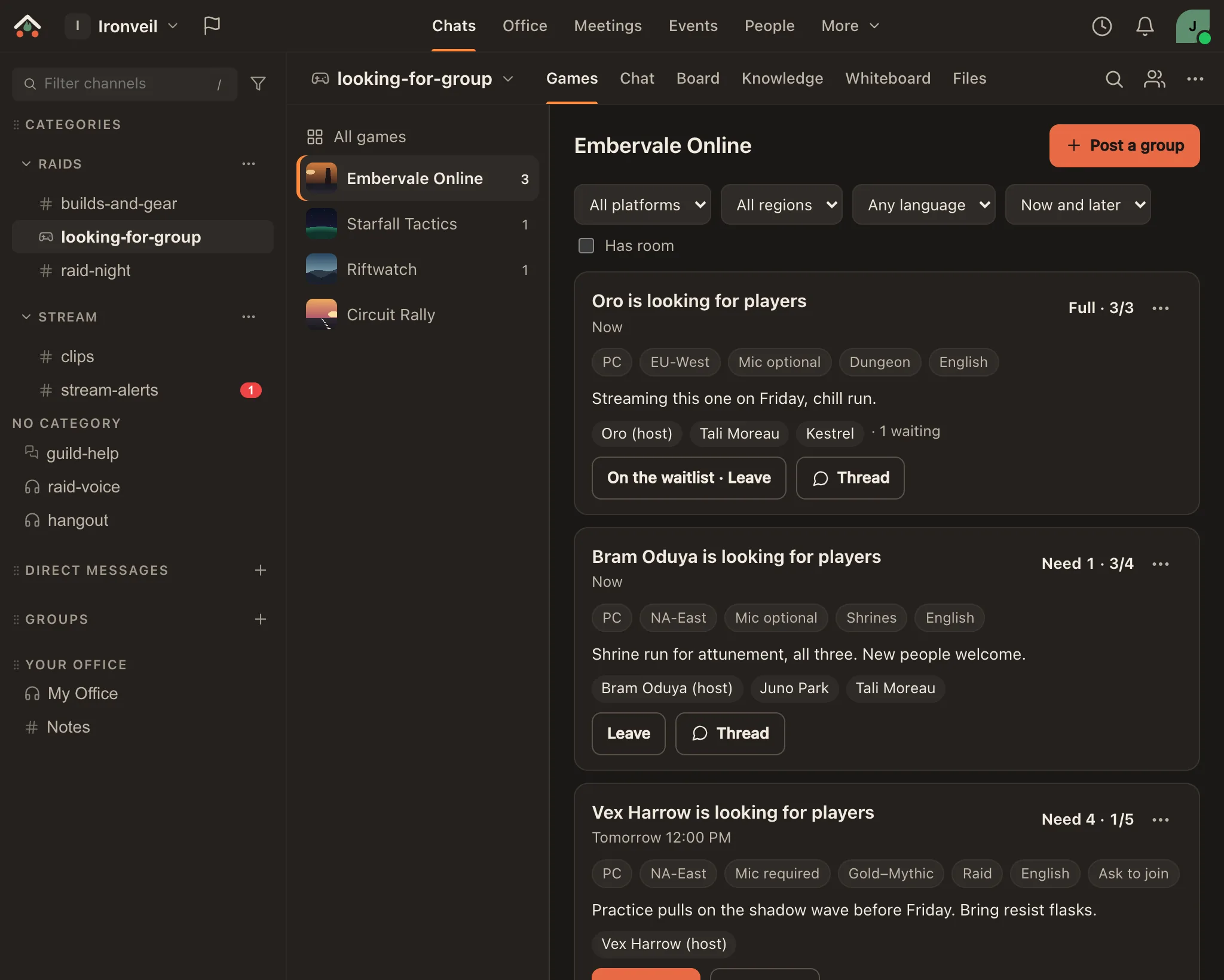
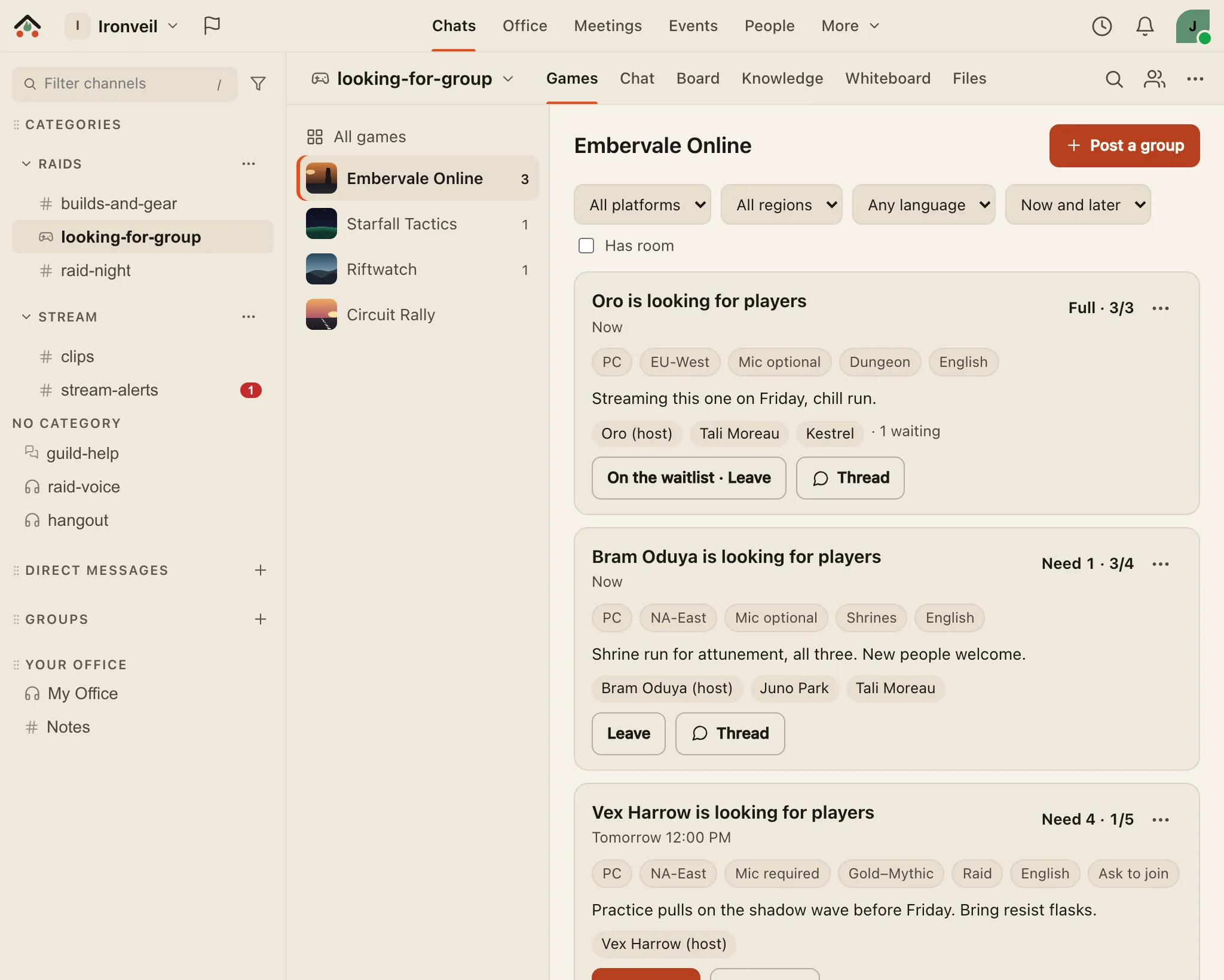
Give a channel a Games tab: a tile for each game your community plays, and on each one the groups people are forming, with platform, region, now or a start time, how many players they need, mic, rank and a note. Join with one tap, ask to join, or take the waitlist when it's full. Each group gets a card and its own thread in the channel; the host can accept, hand over, extend or close it, and groups end on their own.

Game tilesOne per game your community plays, with its own cover.
Slots and a waitlistNeed 1 · 3/4 at a glance; the next person in line gets the open seat.
A thread per groupPlan the run in the channel, next to everything else.
The real Ramphearth app: the Games tab of a looking-for-group channel, with game tiles on the left and, for Embervale Online, three groups: a full one with a waitlist, one that needs one more player, and a raid tomorrow at 8 PM that asks to join. The real Ramphearth app: the Games tab of a looking-for-group channel, with game tiles on the left and, for Embervale Online, three groups: a full one with a waitlist, one that needs one more player, and a raid tomorrow at 8 PM that asks to join.
The real app: the Games tab, with groups that are full, need one more, or start tomorrow.
Creator studio Creator · Business

Give your audience a front door, and put the moments on your stream

Claim a public page at ramphearth.com/@you with your links, schedule and live drops, plus a "Live now" badge when you're streaming on Twitch, YouTube or Kick. Add one browser source to OBS and Ramphearth pops an animated alert for new members, giveaway winners, new patrons and tips.

Fan hubBranding, links, a curated schedule and live drops.
OBS stream alertsKeyed by a secret link you can rotate any time.
Studio-grade voice1440p camera and 4K screen share on Creator and Business, with 96 kbps voice for Creator hosts and everyone on Business.
Make it yours

Themed by each person, for themselves

Every member picks light or dark, a theme preset, a chat background (gradients and patterns, kept readable automatically) and how they look in each space: name, avatar shape and colour. Owners set the space's icon and accent. Try it: open the palette in the top bar to change this site’s mode, accent and flame, the way the app’s Appearance settings do.

Ava Whitfield
Operations Lead · Northwind

A sample card drawn by this page, so you can try the colours here.

Tasks & focus

Turn talk into done

Turn any message into a personal task, set a reminder, and start a focus session (Classic, Deep Work or your own preset) without leaving the conversation.

Send the beta email
Review support macros ▶ 24:18
Draft the webinar outline
Self-host

Run it on your own server

The whole app is open source (AGPL-3.0), and the self-hosted edition is free and ready for early testers: a Linux server for your group, or a Mac or Windows PC to try it out. A setup script installs it, a checker tells you what's wrong, and the guides go step by step. Automatic DNS and a tunnel for a server at home are coming next; until then you bring your own domain.

◧ Linux · Mac · Windows⟳ one-command upgrades✓ setup checker◌ DNS + tunnel: coming next

Self-host Ramphearth →

Desktop app

An app for your Mac or PC

Ramphearth for Mac and Windows has its own notifications, right-click menus with spelling suggestions, push-to-talk in any app, and an icon that follows your theme. Version 0.1.9 brings forum and looking-for-group channels, laser pointers, the word filter and a stricter security policy inside the app. It isn't code-signed yet, so your computer will warn you when you install it.

⌘ macOS⊞ Windows 10 and 11◉ push-to-talk↻ updates itself

Download 0.1.9 →

Live product

Not a rendering. The actual app.

Each screen below is a capture of Ramphearth as it is today, filled with demo data.

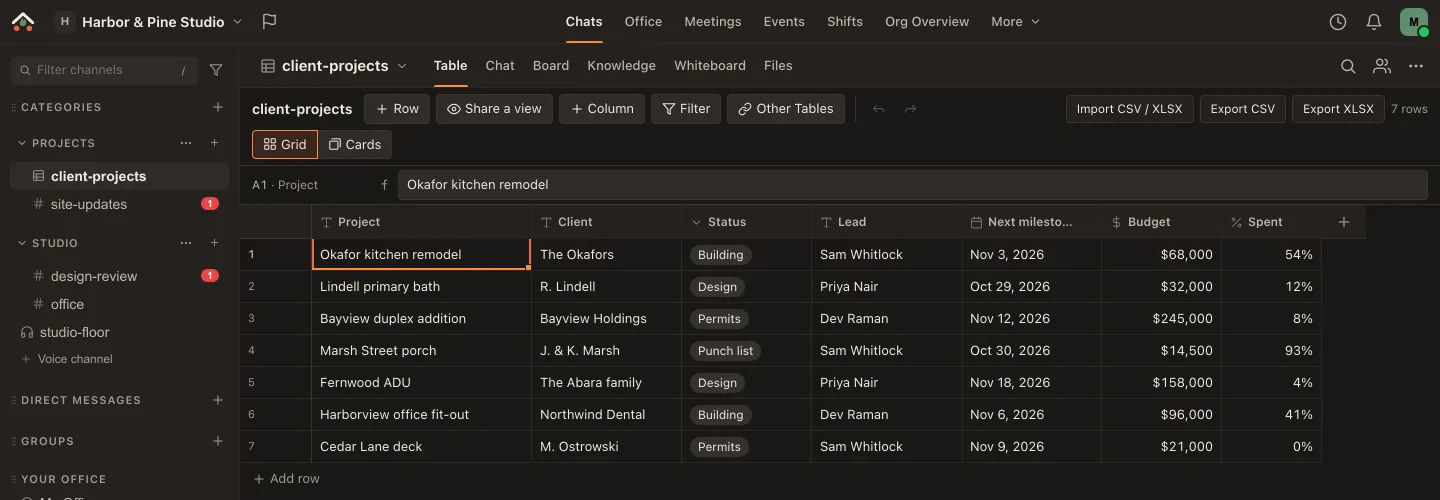
A Ramphearth Table called launch-tracker: eight rows of launch tasks with Status chips (To do, In progress, Done), due dates, owners with avatars, a budget column and a Done percent column, under a toolbar with Share a view, Import CSV / XLSX and Export buttons.
Tables. Typed columns, owners and status at a glance, with CSV and Excel in and out. Share a view and an outside partner sees only their rows.
The #design channel with messages from five teammates, each with their own avatar shape and colour, and a thread panel open on the right with three replies.
Channels and threads. Each person's own avatar shape and colour, replies in a side panel, and the Table, Board, Knowledge and Whiteboard one tab away.
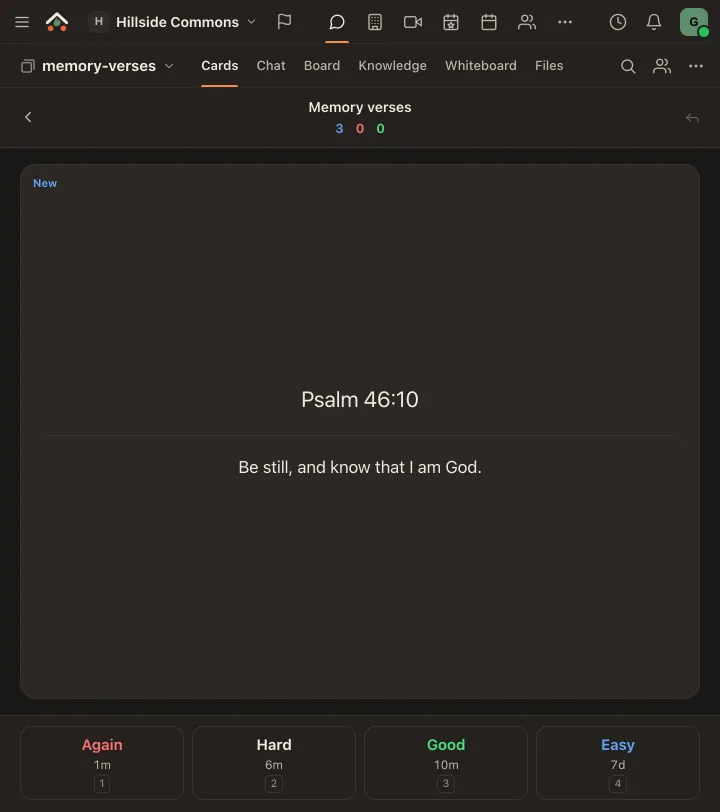
A flash card being studied: the question What is the Atrium? with its answer revealed, and Again, Hard, Good and Easy buttons showing when the card comes back: 1 minute, 6 minutes, 10 minutes, 6 days.
Flash cards. Every button says when you'll see the card again. Space shows the answer; 1 to 4 rates it.

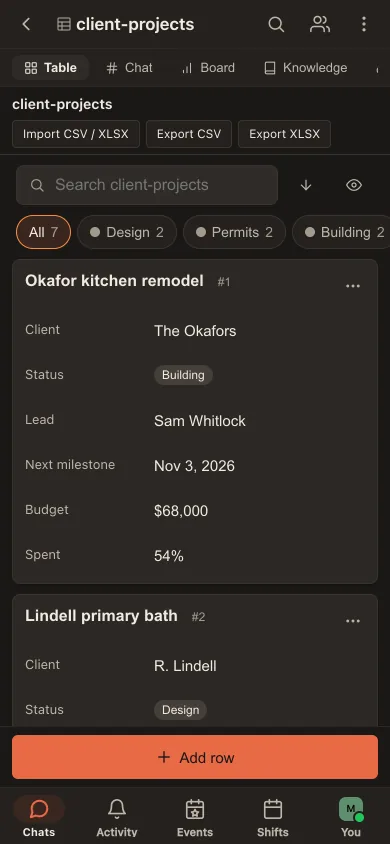
On a phone, the same Table becomes cards.

Filter by status, tick a row done with one tap, add a row with the big button. Ramphearth installs from the browser on iPhone and Android, with notifications.

The launch-tracker Table on a phone: a search box, status filter chips with counts (All 8, To do 4, In progress 3, Done 1) and rows shown as cards with status, due date and owner, plus an Add row button above the bottom tabs.
Table cards, 390 px wide.
Integrations

Plugs into what you already use, and opens up to what you build.

Anything that can notify Discord or Slack can post to Ramphearth. Under that sits a full platform: an API, bots, slash commands, sign-in for other apps and a server for AI assistants. On every plan, with higher limits as you go up.

Works on day one

Webhooks, feeds and email

  • Incoming webhooks in Discord's and Slack's formats, plus GitHub, GitLab, Sentry, Linear, Stripe and PagerDuty
  • Feeds: RSS, Atom, YouTube uploads, podcasts and status pages
  • Email-in: a channel's own address, for announcements or requests by email
  • Calendar feeds of your meetings, shifts and events for Google, Outlook or Apple Calendar
Build on it

API, bots and apps

  • A documented REST API with an OpenAPI description, personal and app tokens with scopes
  • Outgoing events as signed webhooks, or a real-time bot gateway
  • Bots with slash commands, buttons, forms and private replies, and a TypeScript bot SDK
  • Sign in with Ramphearth (OAuth / OpenID Connect) and a curated app gallery
AI and automation

Assistants and no-code

  • An MCP server, so Claude and other AI assistants can read and post with your permission (on Business, an admin turns it on)
  • Zapier, Make and n8n apps, connect through the API and webhooks
  • Anything else through the API: a new event or endpoint works in the automation apps without an update
For creators · Creator & Business

Streams and supporters

  • Twitch, YouTube Live and Kick: go-live posts, stream alerts, "Live now" on your hub and a live line by your name
  • Patreon, Ko-fi and StreamElements: new-patron and tip cards and alerts
  • Linked roles: give subscribers and patrons their role automatically
For churches · Ministry & Business

Planning Center and Scripture

  • Planning Center: this Sunday's teams and plan changes in a channel, people updates, and the church calendar in Ramphearth's
  • Bible verses: type /verse John 3:16, or post a verse of the day (KJV and WEB built in)
  • Prayer requests by email, through a channel's address
For guilds and teams

Servers, games, code and bridges

  • Game-server status for Source / Steam servers, Minecraft and BattleMetrics, with a live card and /server (Creator & Business)
  • Steam: "now playing" and roles for owning a game (Creator & Business)
  • The GitHub App: repos routed to channels, /issue, re-run buttons and link cards
  • Bridges to Telegram and Discord (with your own bot), both ways, on the paid plans

What each plan gets. Webhooks, the API, bots, MCP, email-in and GitHub are on every plan, Free included, with small limits. Feeds and bridges come with the paid plans; the streaming, supporter and gaming connections with Creator and Business; Planning Center and Bible verses with Ministry and Business. The plan table has the numbers. Some connections to outside services need setup before they can be used. Ask us if there's one you need.

Privacy & control

A trusted server, on purpose, and honest about what that means.

Ramphearth is self-funded and private: your data is never sold or shared, there are no trackers, and nobody trains AI on it (the full promise). It isn't end-to-end encrypted, so search, moderation and integrations keep working; instead it keeps your data locked down at rest, keeps integrations on a short leash, and shows admins what happened.

Encryption at rest

  • Uploads are always stored as AES-256-GCM ciphertext
  • Every message sealed under your space's own key, with search kept
  • Every file link is signed for the person viewing it

Sign-in that holds

  • Authenticator apps, backup codes and a secret-number check
  • A code for every new device, and session lists you can sign out of
  • Passwords checked against known-breached lists

Who sees what

  • Owner, Admin, Member and Guest, plus custom roles
  • Per-channel permissions, and category hand-offs to a team lead
  • Bots never read DMs; apps see only the channels they're added to

Your identity, per workspace

  • Choose the name, shape and colour each workspace sees you by
  • Members never see each other's email; Owners and Admins see it only to manage people
  • Invitations come from Ramphearth; your address goes along only if you tick it

An audit trail

  • An audit log for owners and admins
  • Export in the OCSF format, or stream it to your own endpoint as signed webhooks
  • Business admins can allow only approved apps

Calls on our own media servers

  • Voice, video and the office run on media servers we operate, not a per-minute cloud
  • Rate limits and alerts against floods and abuse

Your space, your rules

  • Slow mode, read-only channels and private channels
  • A word filter: slurs and explicit words always, swearing your call
  • Age 13 and up, with teen-safe settings for 13 to 17
  • Switch off any feature you don't use, without deleting anything
  • Departments and an org overview of who's who
  • An admin console every plan gets, including free

Run from one Console

  • Capacity, upgrade recommendations, notices and analytics from our Platform Console: counts and settings, never conversations
  • The self-hosted edition gets the same Console. See it
Apps

On your computer, your phone, or just a browser.

Same space, same account, wherever you are.

macOSApple silicon and Intel, push-to-talk in any app Download
WindowsWindows 10 and 11, keeps itself up to date Download
iPhone & AndroidInstall from the browser, with notifications How to install
WebAny modern browser, nothing to install Open Ramphearth
LinuxUse the web app; no desktop build yet Open in browser
Who it's for

Four very different groups. One product underneath.

A company, a church, a streamer and a guild want different things on the surface and the same thing underneath: somewhere their people actually are.

Businesses & teams

Bring it to work

For teams of three people to thousands who want chat, calls and the office in one place, with the controls a workplace needs.

  • A Virtual Office for the run-ins remote teams miss, with no cap on Business
  • Meetings with clients and contractors who never make an account
  • 1440p cameras, 4K screen share and laser pointers on a shared screen
  • Tables for trackers, with shared views and guest access for outside partners
  • Shifts, time-off approvals and a time clock
  • An audit log and an app allowlist
  • GitHub, Sentry, Linear and the rest posting where the work is

Plan: Business: $10 per active user/mo at every size; $8.00 per active user/mo, billed yearly; 3 seats ($30/mo). Dedicated onboarding included.

More for businesses →

Churches & non-profits

Organise the people who show up

For congregations and volunteer teams where the roster changes every week and care is part of the job.

  • Serving rosters with open slots people claim, in the language of serving
  • Prayer requests with follow-ups and a daily digest
  • Meal trains when someone's in need
  • Planning Center teams and the church calendar, and /verse
  • Memory-verse flash cards, and trivia nights the whole room joins by QR
  • A Virtual Office for small groups and staff
  • A word filter on by default, and teen-safe settings for your youth group

Plan: Ministry, $25 a month up to 250 people, $49 up to 1,000, $99 up to 2,500, for the whole church.

More for churches →

Creators & streamers

Run your community here

For streamers and YouTubers who want a home for their audience that feeds back into the stream.

  • A public fan hub at ramphearth.com/@you
  • OBS alerts for new members, giveaway winners, patrons and tips
  • Twitch, YouTube Live and Kick go-live posts and "Live now"
  • Patreon, Ko-fi and Twitch subscribers get their roles automatically
  • 1440p camera and 4K screen share, 96 kbps voice for hosts

Plan: Creator, $25 a month up to 100 members, $49 up to 250, $99 up to 1,000, then +$99 per additional 1,000, never per person.

More for creators →

Gaming guilds

Raid night, sorted

For clans and guilds who want voice that just works and tools that know about games.

  • Drop-in voice channels with noise reduction
  • Looking for group: game tiles, open slots and a waitlist
  • A help forum where answers get marked and stay findable
  • Game-server status cards and /server
  • Steam "now playing" and roles for owning a game
  • A Discord bridge with your own bot, so nobody has to move at once
  • Raid callouts as flash cards

Plan: start on Free (with one forum); Creator adds looking for group, game-server status, Steam roles, bridges and the Virtual Office.

More for gaming guilds →

A Monday standup, a Sunday roster, a Friday stream, a Saturday raid.
Same product, named for whoever's using it.

Plans

Free to start. Priced for who you are.

Ministry and Creator are one flat price for the whole workspace, set by its size, never per person. Business is per active user, with guest seats and storage that grow with your team. Ministry and Creator start with a Starter size: the same features, for fewer people. Ministry and Creator get two months free when paid yearly; Business is $8.00 per user per month billed yearly.

Free
Small groups getting started
$0
 
Up to 50 members
  • Chat, DMs, group chats, threads and search
  • Voice channels and calls (32 kbps), one screen share at a time
  • Meetings with your own members
  • Knowledge base, whiteboards, custom emoji
  • Flash cards (3 decks)
  • Webhooks, the API, bots, MCP and email-in, with small limits
  • 10 MB files, 2 GB storage
Start free

Start on Free, no card needed.

Ministry
Churches, ministries and non-profits (open to anyone)
from $25 / month
Starter: up to 250 people
$49 / month up to 1,000
$99 / month up to 2,500
Larger? Contact us
2 months free, paid yearly
Up to 2,500 people
  • Virtual Office, cameras and screen share
  • Prayer requests with follow-ups, meal trains
  • Volunteer schedules and Shifts, with ministry event mode
  • Planning Center and Bible verses
  • Giveaways and live quizzes
  • 5 guest seats (3 on Starter), feeds and chat bridges
  • 50 MB files, 50 GB storage (20 GB on Starter)
Contact us to upgrade

Checkout is coming soon.

Creator
Streamers, YouTubers and gaming communities
from $25 / month
Starter: up to 100 members
$49 / month up to 250
$99 / month up to 1,000
+$99 / month per additional 1,000
2 months free, paid yearly
1,000+ members, 1,000 at a time
  • Twitch, YouTube Live, Kick, Patreon, Ko-fi and StreamElements
  • Stream overlays and a public fan hub
  • Game-server status, Steam roles and linked roles
  • Voice at 64 kbps (96 for hosts), screen share up to 4K
  • Virtual Office, cameras, giveaways and live quizzes
  • Feeds and chat bridges
  • 50 MB files, 50 GB storage (20 GB on Starter)
Contact us to upgrade

Checkout is coming soon.

Business
Workplaces that run on it
$10 per active user/mo at every size
$8.00 per active user/mo, billed yearly
3 seats ($30/mo)
No size split; talk to us above 10,000 people
  • Ministry and Creator tools, including Bible study channels
  • Tables, with shared views, outside guests and category hand-offs
  • External meetings: guests, lobby, files and whiteboard
  • 5 guest seats per paid user, pooled (at least 25)
  • Voice at 96 kbps, 300 in voice at once
  • Cameras up to 1440p and screen share up to 4K
  • App allowlist and dedicated onboarding
  • 1 GB files, 10 GB storage per paid user, pooled (at least 100 GB)
Contact us to upgrade

Checkout is coming soon.

Enterprise
Large organisations, and ones with rules to meet
Talk to us
Hosted, per user
Priced for your agreement
Invoiced
As many people as you need
  • Everything in Business
  • Bigger Stages, sized with you
  • Audit log streaming to your own tools
  • A data processing agreement and invoicing
  • Priority support and onboarding
  • Dedicated server instance — your own Ramphearth servers, run and updated by us
  • SCIM provisioning (in development)
Talk to us

We answer from a real inbox.

Priced by what it costs to run: chat is free, calls and storage are what you pay for. Why it costs what it costs

More room for files: 100 GB per block: proposed $5/mo or $50/yr, on your paid subscription on every paid plan, including Starter sizes: added to your existing paid subscription, never sold on its own. Ask from Org Settings; no charge is made by the app. Free workspaces can upgrade for more storage.

Checkout isn't live yet. To move a workspace to Ministry, Creator or Business, contact us and we'll switch it on. Self-serve checkout is coming soon. Prices are in US dollars.

Compare every plan, feature by feature →

Which plan is yours?

Made for different groups, on purpose.

Each plan is built around one kind of group, with what that group runs on and the limits in plain numbers. If you're between two, ask us.

Free

Made forA small group trying Ramphearth, or one that mostly chats: a study group, a family, a small team or a guild's officers. Everything that is cheap for us to run is here, with no card and no time limit.

People
up to 50 members
In voice at once
20
Talking per call
10
Guest seats
None
Largest file
10 MB
Storage
2 GB

Not forGroups that need cameras, the Virtual Office, more than 50 members, or integrations that keep checking other services (feeds, bridges, streaming).

Ministry

Made forA church, ministry or non-profit (anyone may choose it; we don't ask for proof). One flat price for the whole congregation, never per person, with what a church runs on: prayer requests with follow-ups, meal trains, volunteer schedules, Planning Center and Bible verses, plus cameras and the Virtual Office for staff and small groups.

Smaller size
Ministry Starter $25/mo up to 250 people
People
up to 2,500
In voice at once
30 (Starter) / 60 (up to 1,000 people) / 120 (up to 2,500)
Talking per call
25
Guest seats
5
Largest file
50 MB
Storage
50 GB

Not forStreamers and creators (Creator has the streaming and supporter tools), or workplaces that need Tables and outside guests in meetings (Business).

Creator

Made forA streamer, YouTuber or gaming community. One flat price set by the size of your community, with the creator tools: Twitch, YouTube Live and Kick, Patreon, Ko-fi and StreamElements, stream overlays and a public fan hub, game-server status and Steam roles, and screen share up to 4K.

Smaller size
Creator Starter $25/mo up to 100 members
People
up to 1,000, more in 1,000-member blocks
In voice at once
25 (Starter) / 50 ($49 band) / 150 ($99 band), +100 per extra 1,000
Talking per call
25
Guest seats
None
Largest file
50 MB
Storage
50 GB

Not forChurches (prayer, meal trains and Shifts are on Ministry), or workplaces that need Tables, outside guests in meetings or per-person billing (Business).

Business

Made forA workplace that runs on Ramphearth every day. Ministry's and Creator's tools, including Bible study channels, plus Tables with shared views, meetings with outside guests, an app allowlist, workflows that run on their own (25 live, 5,000 runs a month), and guest seats and storage that grow with your team, with a named account rep at Ramphearth who welcomes you, helps you get set up and checks in. Priced per active user. Single sign-on with your own identity provider (OpenID Connect or SAML 2.0). Coming soon: unlimited e-signature envelopes (fair use), pending legal review. Only what you use: switch off any feature you don't need in Org Settings (prayer requests, meal trains, looking-for-group…).

People
no practical limit (10,000; talk to us above that)
In voice at once
300
Talking per call
25
Guest seats
5 per paid user, pooled, at least 25
Largest file
1 GB
Storage
10 GB per paid user, pooled, at least 100 GB

Not forBig communities where most people only read and chat: Ministry and Creator are one flat price for exactly that.

Enterprise

Made forA large organisation, or one with rules to meet: 50 people or more. Everything in Business, plus bigger Stages and meetings sized with you, audit log streaming to your own tools, a data processing agreement, invoicing, priority support and onboarding with your named account rep, and a dedicated server instance — your own Ramphearth servers, run and updated by us. $20 per user a month, from 50 users. SCIM provisioning is in development. Talk to us.

People
as many as you need, above 10,000 too
In voice at once
Custom: sized for your Stages
Talking per call
25
Guest seats
Business's, or more by agreement
Largest file
1 GB
Storage
Business's, or more by agreement

Not forMost teams: Business already has Tables, outside guests in meetings and guest seats, at a price you can see. Start there, and talk to us when you outgrow it.

Start on Free

Pull up a chair.

Create a workspace for your team or community on the Free plan. No invitation or card needed.

Or write to [email protected] · Already have an account? Sign in